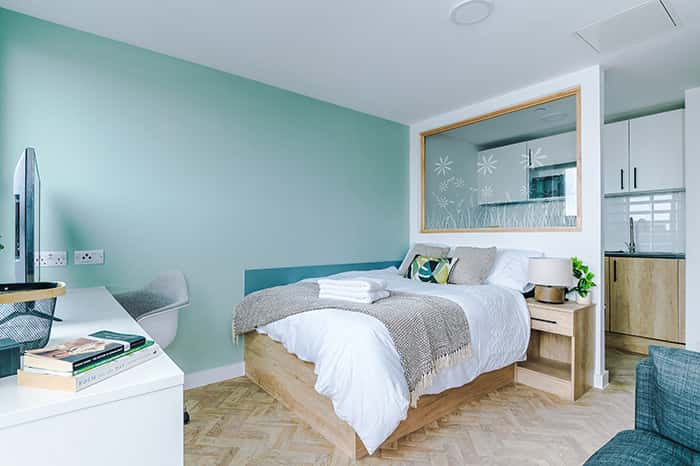
Your Room
Your room will be ready for check-in from 3 pm, unless you have pre-arranged a different arrival time.
To check into your room, please ensure you have:
1. Completed the online check-in process
2. Provided your payment details (unless you have already paid via an online booking agent)
3. Downloaded the Paxton digital key app.
Download your Paxton Digital Room Key
1. Please download the Paxton Key App on your smartphone, via The App Store or Google Play link below, ahead of arrival.
2. If you would prefer a physical key, please skip to point 7.
3. When you download the Paxton App for the first time, it will ask you for a registration code - PLEASE IGNORE THIS.
4. Your key will become active on your arrival day, and a unique key link will be sent to you just before your check-in time (standard time: 3 pm). This will be sent to you via the guest chat, via email, or via the messaging system provided by your booking agent.
5. Once clicked, the link will automatically store the digital key within the Paxton app for you to access.
6. However, if you do not complete the self-check-in beforehand (including payment information), we will be unable to send you your key(s).
7. Prefer a physical key? While the Paxton digital key app provides fast-track check-in and immediate access upon arrival, if you would prefer a physical key, we will happily organise this for you. Please liaise with guest services before your arrival so we can prepare this for you.
Accessibilty and PEEP
8. If you have any accessibility requests and require a PEEP please ensure you check in at reception and speak to a member of the team prior to going to your room. If you are a returning guest, please advise us as above as your details may not be saved from your previous stay.
Are you a Returning Guest? - Digital Key Access
If you have stayed at City Studios before, to access your Digital Room Key, you will need to delete any previous key stored on the App. To do this:
Step 1. In the Paxton key app, click on the 3 lines on the top left corner to access settings. Step 2. Under manage credentials, click on the X for the Bluetooth token to delete previous credential. Step 3. Confirm deletion. Step 4. You should now be taken to the starting screen for the Paxton app. Click Get Started to register new key. Step 5. Click on the Paxton key link provided in your email to automatically input your registration code.
Parking and Access to the Building
If you are arriving by car and wish to park at City Studios, paid parking is available in the large car park to the rear of the property off Brookfield Street. This is managed by an external company and is not managed by City Studios. Paid parking is currently priced at £13 for up to 24 hours.
You can access the building via the car park gate, or via the main gate off North Road, using your smartphone key.
If you do not have your digital key, ring the doorbell and a member of staff will arrive to assist you.
Please note: This car park is not managed by City Studios, and vehicles are left at the owner's own risk. Alternative paid parking options can be found further along Brookfield Street, and on Victoria Street or North Road.
If arriving on foot via the main gate on North Road, your smartphone key will provide access to open this gate.
Your accommodation is accessed via the building directly in front of the main gate, where the postboxes and accessible lift are located.
Enter the glass doors and continue up the steps, through the corridor, until you arrive at the lift and stairs. From here, follow the signs for your room.
Reception is located in the building off the main courtyard.
Your Room
Your room will be ready for check-in from 3 pm, unless you have pre-arranged a different arrival time.
To check into your room, please ensure you have:
1. Completed the online check-in process
2. Provided your payment details (unless you have already paid via an online booking agent)
3. Downloaded the Paxton digital key app.
Download your Paxton Digital Room Key
1. Please download the Paxton Key App on your smartphone, via The App Store or Google Play link below, ahead of arrival.
2. If you would prefer a physical key, please skip to point 7.
3. When you download the Paxton App for the first time, it will ask you for a registration code - PLEASE IGNORE THIS.
4. Your key will become active on your arrival day, and a unique key link will be sent to you just before your check-in time (standard time: 3 pm). This will be sent to you via the guest chat, via email, or via the messaging system provided by your booking agent.
5. Once clicked, the link will automatically store the digital key within the Paxton app for you to access.
6. However, if you do not complete the self-check-in beforehand (including payment information), we will be unable to send you your key(s).
7. Prefer a physical key? While the Paxton digital key app provides fast-track check-in and immediate access upon arrival, if you would prefer a physical key, we will happily organise this for you. Please liaise with guest services before your arrival so we can prepare this for you.
Accessibilty and PEEP
8. If you have any accessibility requests and require a PEEP please ensure you check in at reception and speak to a member of the team prior to going to your room. If you are a returning guest, please advise us as above as your details may not be saved from your previous stay.
Are you a Returning Guest? - Digital Key Access
If you have stayed at City Studios before, to access your Digital Room Key, you will need to delete any previous key stored on the App. To do this:
Step 1. In the Paxton key app, click on the 3 lines on the top left corner to access settings. Step 2. Under manage credentials, click on the X for the Bluetooth token to delete previous credential. Step 3. Confirm deletion. Step 4. You should now be taken to the starting screen for the Paxton app. Click Get Started to register new key. Step 5. Click on the Paxton key link provided in your email to automatically input your registration code.
Parking and Access to the Building
If you are arriving by car and wish to park at City Studios, paid parking is available in the large car park to the rear of the property off Brookfield Street. This is managed by an external company and is not managed by City Studios. Paid parking is currently priced at £13 for up to 24 hours.
You can access the building via the car park gate, or via the main gate off North Road, using your smartphone key.
If you do not have your digital key, ring the doorbell and a member of staff will arrive to assist you.
Please note: This car park is not managed by City Studios, and vehicles are left at the owner's own risk. Alternative paid parking options can be found further along Brookfield Street, and on Victoria Street or North Road.
If arriving on foot via the main gate on North Road, your smartphone key will provide access to open this gate.
Your accommodation is accessed via the building directly in front of the main gate, where the postboxes and accessible lift are located.
Enter the glass doors and continue up the steps, through the corridor, until you arrive at the lift and stairs. From here, follow the signs for your room.
Reception is located in the building off the main courtyard.